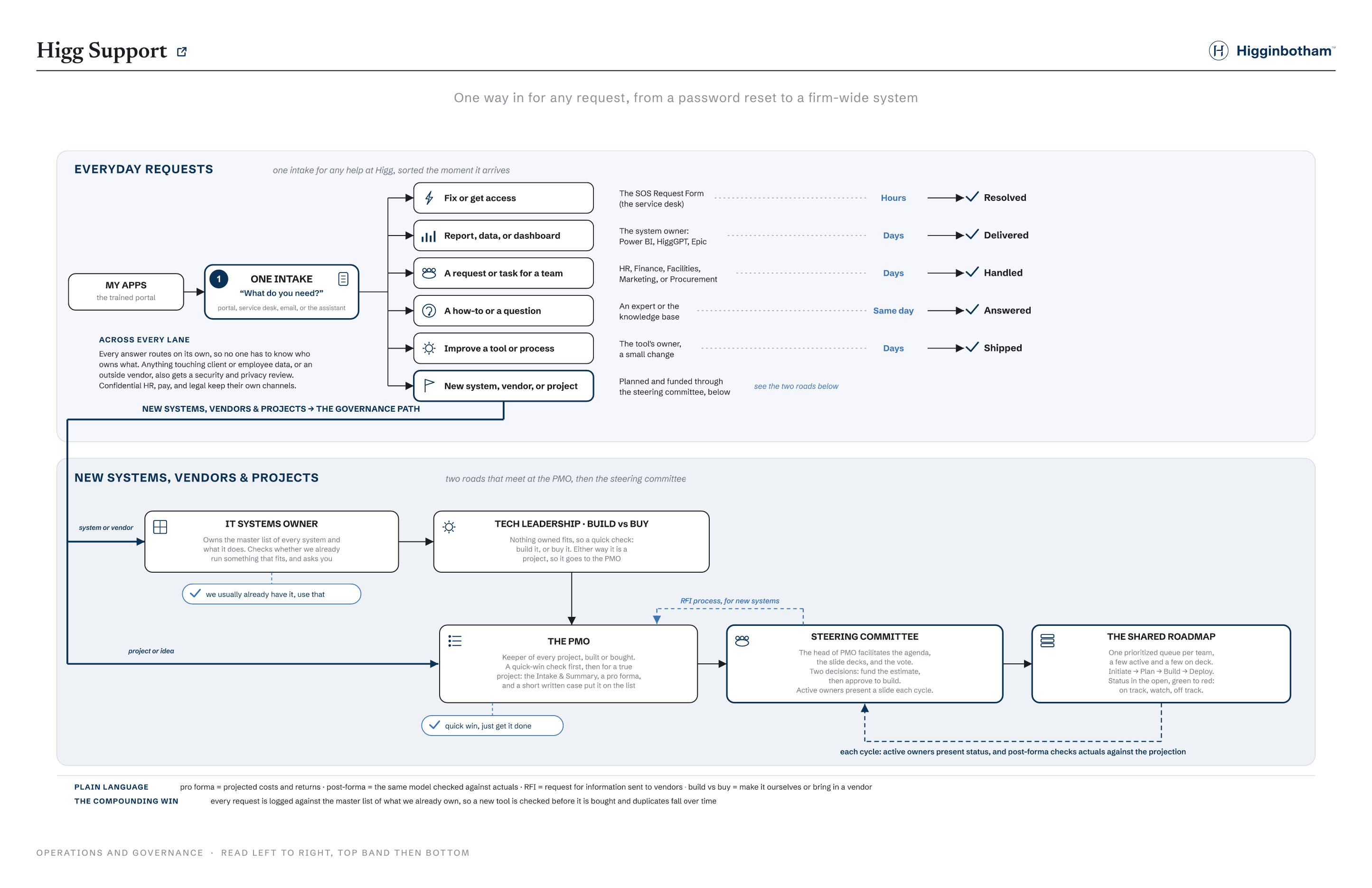
Pick the option that fits best. Your answer routes the request automatically, so you never have to know who owns what.
Higginbotham SOS Request Form
Please fill out this form to help us understand and resolve your technical issues effectively.
A ticket receipt is automatically sent to your email address after the form is submitted and a ticket is generated
Hi, Pat. When you submit this form, the owner will see your name and email address.
* Required
Yes
No
Microsoft 365
This content is created by the owner of the form. The data you submit will be sent to the form owner. Microsoft is not responsible for the privacy or security practices of its customers, including those of this form owner. Never give out your password.
Ticket generated
Your SOS ticket is in
Reference REQ‑4821 · A receipt was emailed to you · Typical turnaround: same day
You Higg Support Service Desk
What happens next
1It follows the normal SOS processSame form, same queue the service desk already uses. From here it is handled like every other SOS request.
2A technician picks it up, you get updates by emailNo committee, no waiting on a meeting. Track it under Requests any time, most items close the same day.
Higg Support · Quick request
What can we help with?
Two quick picks and Higg Support sends it straight to the right owner. Change the answers and watch the routing update.
Routes to the right team
Request logged
Sent to the right team
Reference REQ‑4834 · You will hear back by email, usually within a day or two
You Higg SupportThe right team
What happens next
1The owner sees it directlyIt goes straight to the team or system owner who handles that, not a committee.
2It joins their queue or next updateSimple asks get handled quickly. Anything bigger than a quick win gets flagged as a project.
Higg Support · New
What are you starting?
All three are planned and prioritized through the same governance. Bringing in an outside system or vendor adds a few reviews on top.
Higg Support · New system or vendor
Bringing in a new system or vendor
We first check whether we already own something that fits. If not, a build-vs-buy call, and either way it becomes a project the PMO takes to the committee, out to an RFI only if the committee approves buying.
How a new system moves
1The IT systems owner checks firstOne owner keeps the master list of every system and what it does. They check whether we already run something that fits, and ask you. A good chunk of the time, we do.
2Build vs buy, with Tech LeadershipIf nothing fits, a quick check: could we build this ourselves, or should we buy it? Either answer makes it a project.
3Into the PMO, then the committeeAs a project it gets the Intake & Summary, a Finance-vetted pro forma, and a short written case; the PMO carries it to the steering committee for the fund-then-build decisions.
4RFI, then shortlist and contract, only if the committee approves buyingThen it goes to market: our standard RFI to a short list of vendors, then evaluate and present, IT security reviews the finalist, and Procurement and Legal handle the contract (over $25K, Finance).
Higg Support · System request
Tell us about the system you need
Before we go looking, we capture the need in plain terms. This is what the committee weighs, and it shapes the RFI we send to vendors.
Intake
System Request
Higg Support
Requested by
What system or capability do you need?
Why do you need it? the business use case
What do you do today without it?
What are the benefits of having it?
Who would use it, and how many?
Urgency and rough budget
Higg Support · New project
This one opens the real intake form
Bigger asks use the PMO's actual Project Intake & Summary form. Scroll through it to see what it captures, then click Complete form at the bottom to auto-fill a sample and continue.
Sample answers filled in for the demo. Scroll to review, then continue.
PMO
Project Intake & Summary
Higginbotham PMO Intake template
Project intake
Project name
Requestor
Requestor department
Date
Project purpose strategic and operational
Project background
Engagement needed / high-level scope
Analysis Business process (current state) Business process (future state) Solutioning (may include a pilot) Implementation Project management Report requirements gathering Other
Impact and cost
Impacted departments
Cost
No costCost unknown (analysis needed)Cost known
Reach
Minimala single processLowone teamModerateseveral teamsHighthe full firmExtensivefirm and clients
Urgency
LowMediumHighCritical
Importance
LowMediumHighCritical
Risks
Scope creep Stakeholder alignment Resource availability Disruption to business as usual Complexity Legal or compliance
Project summary
Description 2 to 3 sentences
Out of scope
Measures of success
Reduce staff hours required Fewer errors or defects Faster process completion Lower costs or savings achieved Improved data quality Higher customer or user satisfaction Less manual work, more automation High adoption by end users Standardized processes Increased revenue or productivity
Solution deployment and oversight
Pilot Software implementation External vendor search or internal build (RFI) Accountability plan Operational maintenance plan Utilization metrics created
Sponsors and ownership
Project sponsor
Project owner
Project manager
Funding sponsor over $25K annual: BJ Meyer / Wes Snow
This walkthrough shows the intake fields that drive prioritization. The full template also captures key activities and milestones, training, communication, assumptions, project team, and stakeholders.
Higg Support · Steering committee
How the steering committee decides
Built for Higginbotham, drawing on a proven IT governance model. A project is not approved in one shot: it earns two clear decisions, and the numbers get vetted by Finance in between, so nothing large is funded on a hunch.
How a project earns approval
Before the committee
1 · Business case, signed offThe requester writes a short case; their department leader signs off before it takes the committee's time.
2 · Quick-win checkIf it is small and low-effort and will not bump current priorities, it skips the committee and just gets done.
Two committee decisions
3 · First review: fund the estimateThe committee decides only whether it is worth scoping and pricing. Yes means a team is assigned to estimate it.
4 · Estimate and pro formaThe PMO scopes the effort; Finance vets the pro forma. Nothing reaches the second vote without real numbers.
5 · Second review: approve to buildWith true cost and return in hand, the committee approves it into the delivery queue, or parks it with a reason.
Who is in the room
Commercial Lines Employee Benefits Personal Lines Operations Finance IT and PMO (chair)
The head of PMO facilitates the agenda, the slide decks, and the vote. Every active-project owner sends a slide and gives a quick update each cycle, so work that stalls gets noticed.
What the committee reviews
Primary request docThe Project Intake & Summary
The PMO's standard form, the one filled a moment ago
Business need, purpose, background, and options
Reach, urgency, importance, cost, and risks
Measures of success, sponsors, and any legal or regulatory driver
Attached for the numbersThe pro forma, vetted by Finance
A multi-year cashflow, with payback, IRR, and NPV
The cost of doing nothing, weighed against the spend
A sensitivity range on the assumptions that matter most
A post-forma that tracks actuals against the projection
The Project Intake & Summary is the request; the pro forma is attached as the financial detail.
What the committee weighs
Criteria
What it asks
Weight
Strategic fit
Supports the firm's goals and Build to a Billion
25%
Revenue or expense impact
What it earns, saves, or protects
25%
Reach and experience
How many clients and staff it helps, and how much
15%
Effort and cost
What it takes IT and the business to deliver
15%
Legal or regulatory
Whether a rule or carrier requirement forces it
10%
Risk
Risk of doing it, and of not doing it
10%
Illustrative weighting. The committee sets and publishes the final rubric.
Higg Support · RFI
Out to vendors: the RFI
The steering committee approved buying (no tool we already own fits), so it goes to market on the PMO's standard RFI, tweaked for this need and sent to potential suppliers.
PMO
Request for Information
Higginbotham RFI standard template
The package we send
The RFI document (purpose, our overview, rules, process, confidentiality) A cover letter to each supplier The RFI Criteria sheet vendors fill in An NDA (Service Provider Form), if the vendor needs one
Timeline sent to vendors
Release RFI
MM/DD/YYYY
Notification of intent to respond
MM/DD/YYYY
Written responses due (via email)
MM/DD/YYYY
Notification of suppliers for presentation
MM/DD/YYYY
RFI criteria (vendors respond in this sheet)
Criteria
Response
Additional info
Comments
1 · Capabilities & scope (tailored to this need)
Does the platform deliver the core capability we defined?
Yes / Partially / No
2 · Security & infrastructure
Do you attest to SOC 2, NIST, ISO, or HIPAA compliance?
Yes / No
Provide evidence
Is all data stored in the US or North America?
Yes / No
If not, where
Do you support Microsoft Entra single sign-on?
Yes / No
Recent third-party audit and penetration testing?
Yes / No
How often
3 · Current use cases
Active clients on your system, and two references we can call?
Pricing model, SLA, and remediation for a missed SLA?
Describe
Vendors write their responses directly in this sheet and return it. The team scores each one and shortlists.
Prioritized and visible
On the shared roadmap
Approved projects enter one prioritized queue. Each department keeps a short prioritized list, a few active and a few on deck, and the committee sets priority across them, with delivery status in the open.
#
Project
Department
Stage
Status
Active, in delivery (up to 5)
1
Producer onboarding refresh
Operations
Deploy
On track
2
Carrier data automation
Commercial Lines
Build
Watch
3
Renewals dashboard v2
Employee Benefits
Build
On track
4
Agency-bill reconciliation
Finance
Plan
On track
5
Client portal single sign-on
IT and PMO
Initiate
On track
On deck, approved and queued (up to 5)
6
Unified Client Onboarding Portal Just approved
Commercial Lines
Queued
Not started
7
Personal Lines quoting refresh
Personal Lines
Queued
Not started
8
Commission statement automation
Finance
Queued
Not started
On track: on budget and on schedule Watch: slipping on cost or timeline Off track: well over, well behind, or scope in dispute
This is the whole point. One way in, one queue, one transparent decision. Leaders stop trading favors in the hallway, and everyone can see what is funded, what is next, and how it is tracking, and why.
Higg SupportLoading… click the glowing area
Click the glowing blue area to move to the next screen.